Pharmaceutical Manufacturer · Salesforce to HubSpot Migration
Salesforce To HubSpot.
Then We Stayed.
A pharmaceutical manufacturer needed its entire revenue stack off Salesforce. We ran the migration, documents and e-signatures included, and stayed for 18 months after go-live. Cutover is the start. The year after is where most migrations die.
18+ mo
Partner support after go-live
1
Unified revenue platform, CRM to contract
SF to HS
Full stack moved: CRM, quotes, e-sign
Board
Level budget cadence, run from HubSpot
02 · The short version
The story in 30 seconds.
The problem. A pharmaceutical manufacturer ran its core CRM on Salesforce, with quotes and e-signatures in separate tools. Pipeline data was constantly out of sync, and channel budget decisions were argued from exports that never matched.
What changed. We moved the entire revenue stack onto HubSpot as one system, CRM, documents, and e-signatures together, and rebuilt tracking so inbound and outbound stamp the same campaign field at submission.
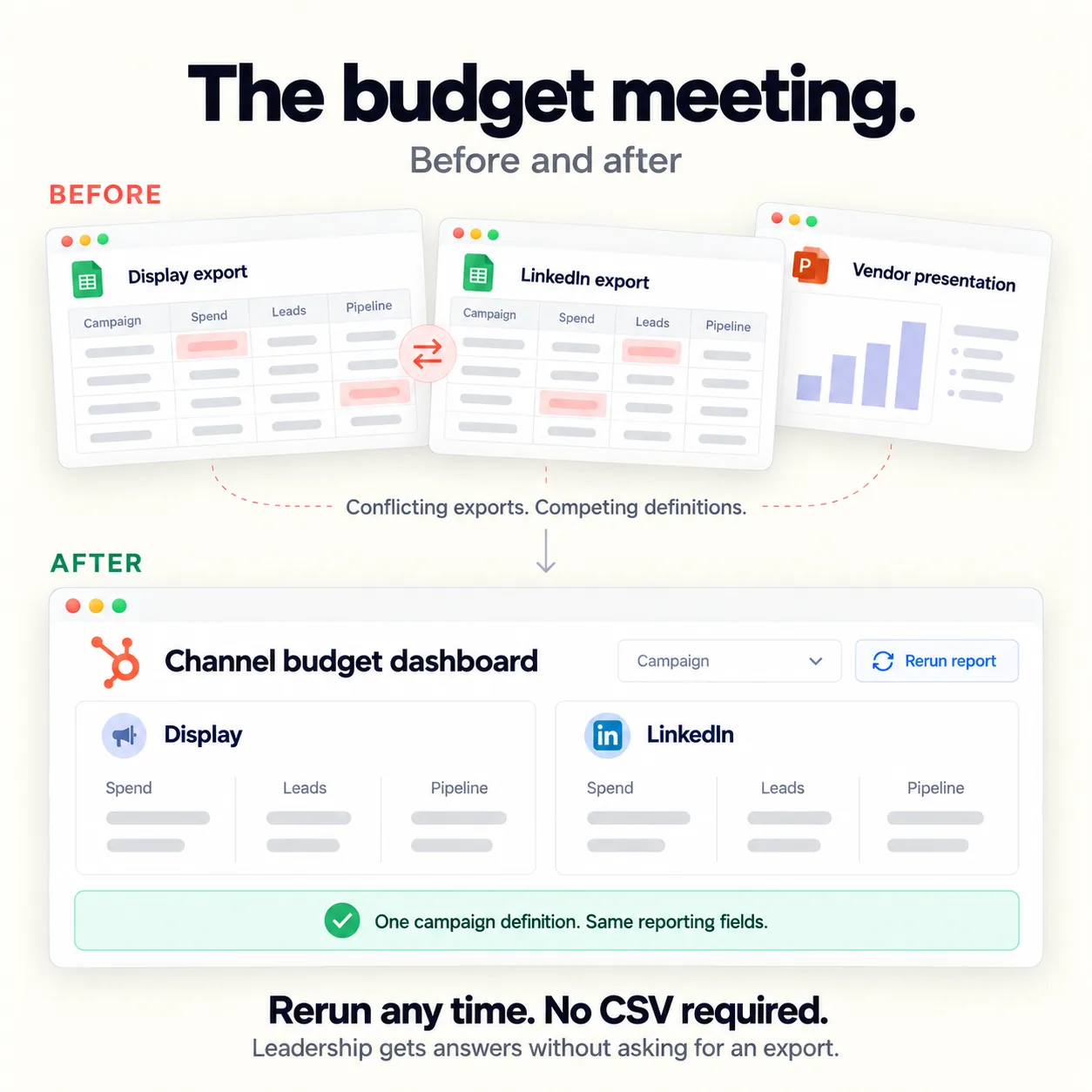
The result. Marketing budget decisions now follow a data-backed comparison leadership can rerun any time without exporting a CSV. Display versus LinkedIn became an apples-to-apples call.
Why it stuck. We stayed. Eighteen months after go-live, the partner that built the system is still in the operating cadence, keeping the data architecture clean.
03 · The problem
A Fragmented
Revenue
Stack.
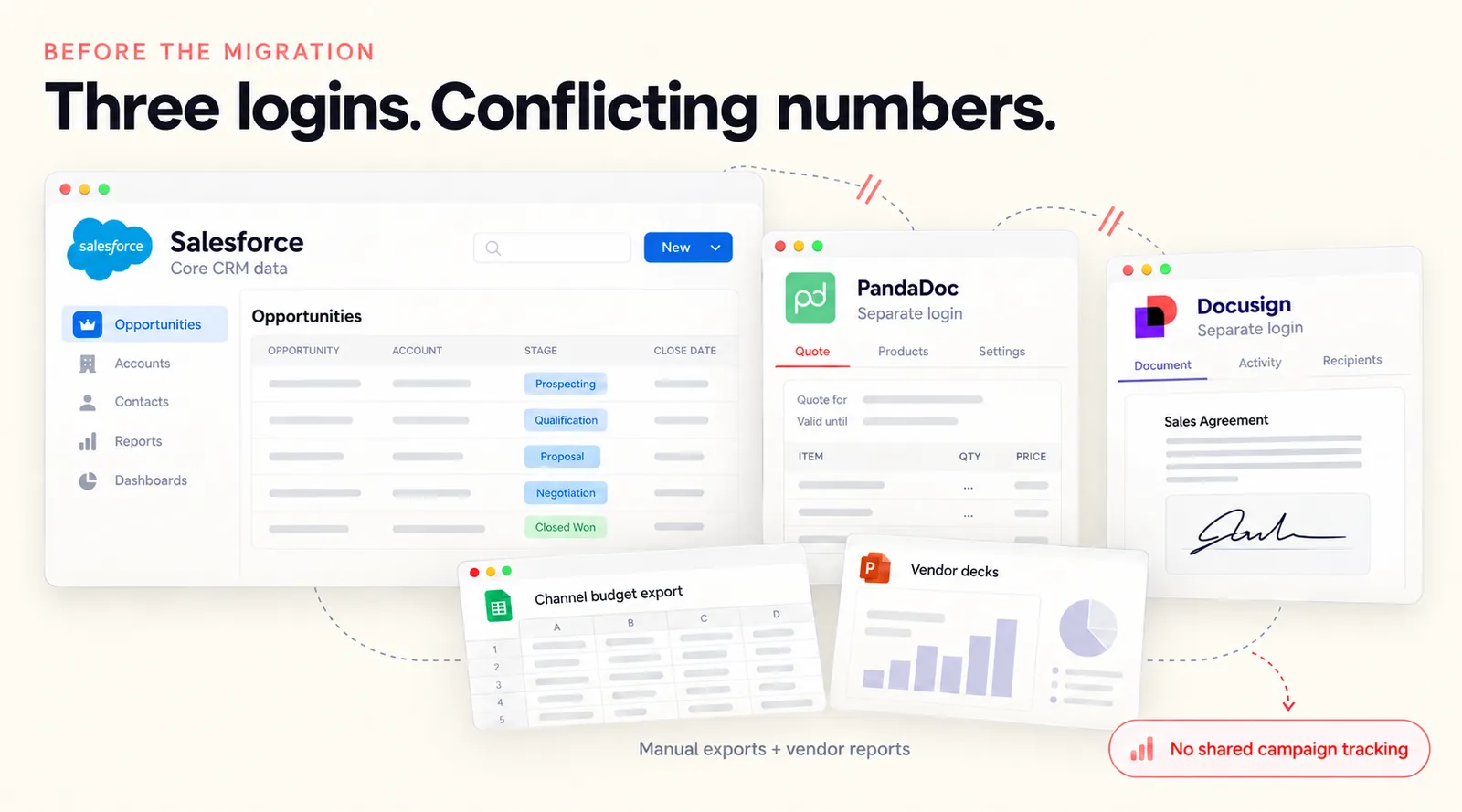
Before the migration, the company's revenue stack was heavily disjointed. Salesforce held the core CRM data, but quotes and e-signatures lived in entirely separate tools. The systems did not talk to each other, so pipeline data was constantly out of sync and every strategic decision needed manual intervention first.
Budgeting was worse. Channel budget decisions ran on disconnected data exports that never quite matched up. Marketing and sales spent the meeting debating whose numbers were correct instead of deciding where the next dollar should go.
And a new login screen does not fix a broken Tuesday pipeline meeting. Without a shared campaign stamp and an implementation partner who stays to enforce the new process, teams slide back into their old side spreadsheets. It is the pattern we describe in our guide to what actually breaks in a Salesforce to HubSpot migration: the cutover is the easy part.
They did not need a new CRM. They needed one revenue system, one version of the numbers, and someone to stay until the new cadence held.
04 · What we actually did
Three
Moves.
01
Move CRM, documents, and e-sign together.
We moved the entire revenue stack onto HubSpot as one system. Leaving quoting and contracting in a separate login guarantees data drift after go-live, so quotes and e-signatures came across in the same cutover, with PandaDoc connected inside HubSpot instead of living in its own login.
The result is a single source of truth from the first lead record to a signed, closed-won contract. One record, one timeline, nothing re-keyed between tools.

02
Stamp campaigns at submit.
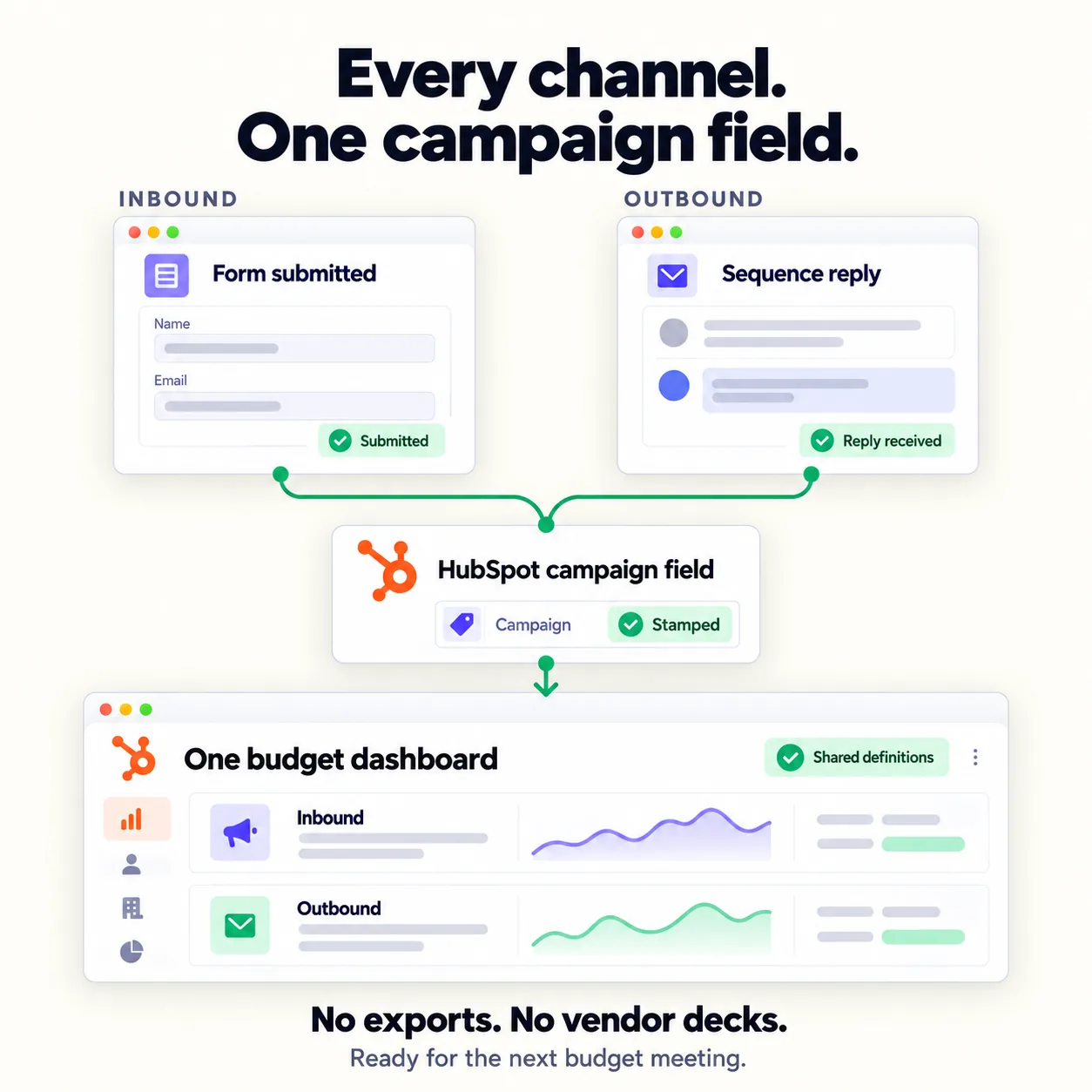
We rebuilt the tracking architecture so inbound and outbound channels write to the exact same HubSpot campaign field at submission. No channel grades itself anymore.
The budget meeting stopped being a battle of two conflicting spreadsheet exports and became a single, trusted dashboard. Same definitions for every channel, so the comparison is honest.
03
Stay for the operating cadence.
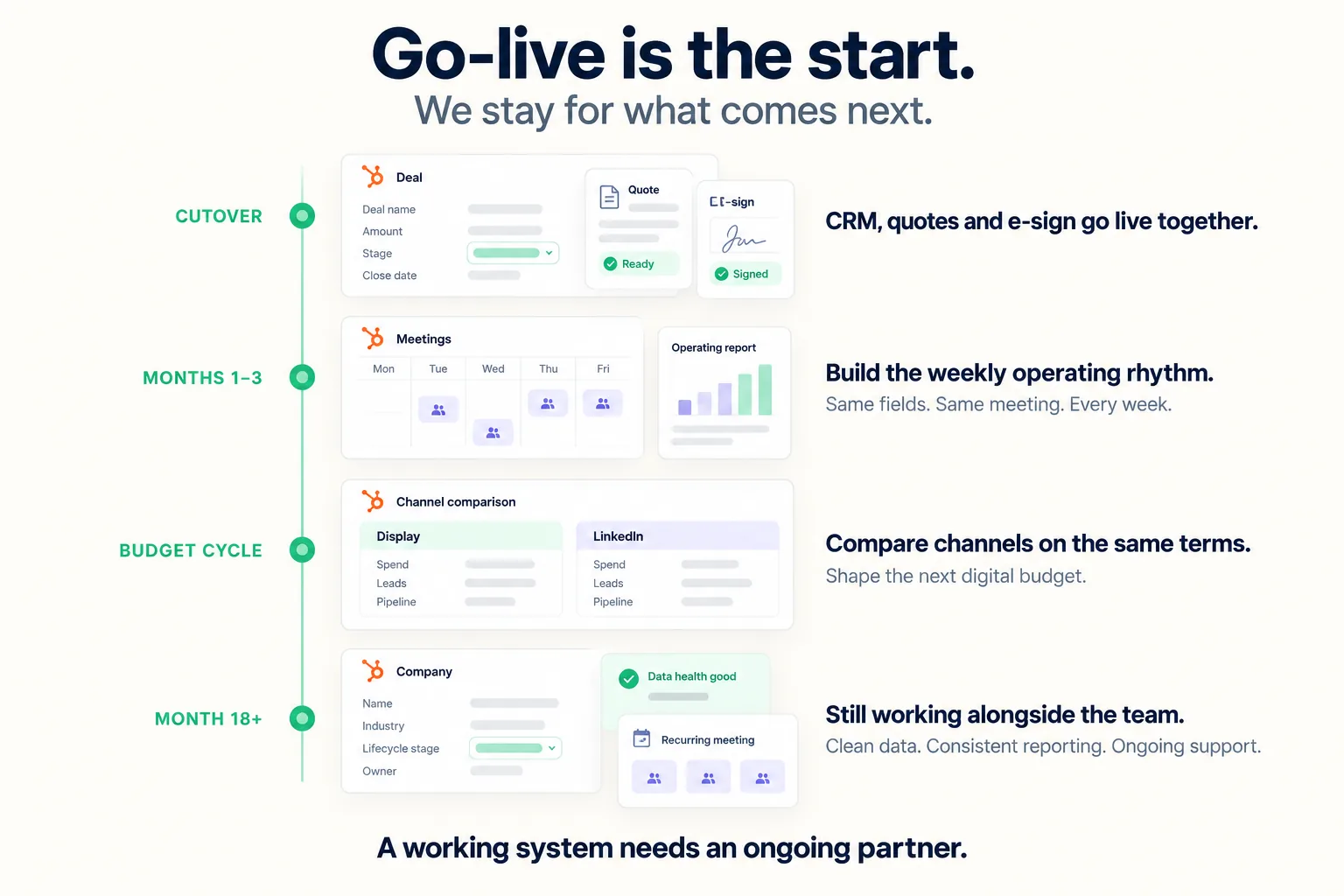
Most agencies hand over the keys at cutover and leave. We stayed. Display ads versus LinkedIn became a repeatable, apples-to-apples comparison that set the next digital budget. Same fields. Same meeting. No vendor decks.
That is the part of a migration no project plan covers, and it is where most of them die. It is also why post-launch support is scoped into every HubSpot CRM implementation we run, not sold as an add-on afterward.
05 · The result
One
Revenue
Motion.
The company's entire revenue stack now runs on HubSpot. Marketing budget decisions follow a strict, data-backed comparison that leadership can rerun at any time without exporting a single CSV. And the same RevOps partner that built the system is still in the operating cadence 18 months later, keeping the data architecture clean.
System architecture
Salesforce
HubSpot
Quote and e-sign
Separate tools, disconnected
Unified in the same motion
Channel budgeting
Vendor charts and manual exports
Repeatable Display vs. LinkedIn reports
Partner support
None after launch
18+ months of integrated support
Why the usual migration fails
A new login does not change how a company runs its Tuesday meeting. Teams that migrate the CRM and leave quoting, e-sign, and campaign tracking behind rebuild the same silos inside a year. Moving everything at once, and staying to run the new cadence, is what made this one hold.
06 · Sound familiar?
If three hit home, we should talk.
Your CRM, quoting, and e-signature live in three different logins.
Marketing and sales bring different numbers to the same budget meeting.
Your channel budget decisions come from vendor decks and manual exports.
Your last implementation partner handed over the keys at go-live and left.
Reps slid back into side spreadsheets within months of the new CRM.
20 minutes. No deck. We'll tell you whether we can help or not.
07 · FAQ
Questions we get asked.
How long does a Salesforce to HubSpot migration take?
The technical cutover usually takes weeks to a few months, depending on data complexity. The timeline to operational maturity is much longer, which is why post-migration support matters more than the cutover date.
What usually breaks after a CRM migration?
Adoption and reporting. When quoting, e-signature, or campaign tracking stay in siloed tools, reps revert to old habits and leadership loses visibility into pipeline ROI almost immediately.
Should the migration partner leave after go-live?
No. The hardest part of a migration is not moving the data. It is changing how the company operates. A partner should stay and help run the new system until the new cadence becomes muscle memory.
Why move quotes and e-signatures in the same cutover as the CRM?
Because leaving them in a separate login guarantees data drift after go-live. Moving CRM, documents, and e-signatures together gives you one source of truth from lead creation to a signed, closed-won contract.
How do you make inbound and outbound channels comparable in HubSpot?
Both write to the same campaign field at the moment of submission. Once every channel stamps the same property, the budget meeting runs from one dashboard instead of two conflicting exports, and you can rerun the comparison any time without touching a CSV.
08 · Keep reading
More on migrations.
Case study
A CRM migration on deadline. Then a rebuild.
A freight brokerage had to leave its legacy CRM before the contract expired. Go-live landed ahead of the deadline, then the work expanded into operations.
Read the Worldwide Logistics case studyGuide
Salesforce to HubSpot migration: timelines, costs, what breaks.
The 8-week migration sequence, the real cost once you count rep time, and the situations where we tell teams to stay on Salesforce.
Read the migration guidePlaybook
Salesforce to HubSpot migration for B2B SaaS.
What to port, what to archive, and the object-mapping traps that catch first-time migrations.
Read the SaaS playbookService
HubSpot CRM implementation.
Phased rollouts, real-data training, and adoption scoped in from day one. The same engagement model this migration ran on.
See how we scope a migration09 · Next step
Stop
Your
Revenue
Leaks.
Give us 20 minutes. We will map exactly where your current CRM setup is leaking revenue, or tell you straight that we are the wrong firm for the job.
20 minutes. No deck. Straight talk about whether we can help.